
Python's built-in logging module tags every message with a log level: DEBUG, INFO, WARNING, ERROR or CRITICAL. The level you set decides which messages are written, so you can keep detailed output while developing and only the important messages in production.
This guide explains what each level is for, how to set the level in code, from a command-line flag or from an environment variable, how logger and handler levels work together, and how levels carry over when you send Python logs to OpenTelemetry.
Key takeaways
- Python's default level is WARNING, so
info()anddebug()print nothing until you set one. - Run production at INFO and switch to DEBUG only while you investigate.
- Read the level from a
--log-levelflag or aLOG_LEVELvariable, so changing it needs no code edit. basicConfigdoes nothing if logging is already set up: passforce=Trueor set the root logger's level.- Set library loggers such as
urllib3to WARNING to hide their DEBUG and INFO lines.
01 · Basics
The Python logging levels
The method you call sets a message's level: log.debug(), log.info(), log.warning(), log.error() or log.critical(). These are the five levels, from least to most serious:
| Level | Use it when |
|---|---|
| DEBUG | Details you only need while tracking down a bug.log.debug("cache miss for user 42") |
| INFO | Normal events that show the program is doing its job.log.info("order 1042 placed") |
| WARNING | Something unexpected happened, and the program handled it.log.warning("payment API slow, retrying") |
| ERROR | An operation failed.log.error("charge failed for order 1042") |
| CRITICAL | The program can't keep running.log.critical("database unreachable, exiting") |
Set the level
Set the level once, when the program starts, with logging.basicConfig. Messages at that level or above are printed, and messages below it are dropped:
app.py
import logging

logging.basicConfig(level=logging.INFO)
log = logging.getLogger("app")

log.debug("cache miss for user 42")
log.info("order 1042 placed")
log.warning("payment API slow, retrying")
$ python app.py
INFO:app:order 1042 placed
WARNING:app:payment API slow, retrying logging.getLogger("app") returns a logger named app, the object you log through. The DEBUG message is dropped because DEBUG is below INFO.
Without the basicConfig line, the script prints only payment API slow, retrying. Python's default level is WARNING, which is why log.info() and log.debug() print nothing until you set a level.
To change the level for one part of your program, call setLevel on its logger. This line turns on DEBUG messages for the app.db logger while everything else stays at INFO:
logging.getLogger("app.db").setLevel(logging.DEBUG)Choosing a level
Ask these questions in order and use the first level that fits:
- Can the program no longer keep running?CRITICAL
- Did an operation fail?ERROR
- Did something go wrong that the program recovered from?WARNING
- Would you want this line in production logs every day?INFO
- Is it only useful while debugging?DEBUG
Run production at INFO and switch to DEBUG while you investigate a problem.
02 · Configure
Set the level from a flag or environment variable
With logging.INFO in the code, seeing DEBUG messages means editing the code. Read the level from outside instead: a command-line tool takes a flag, and a service in a container reads an environment variable. Python reads neither on its own, so the program passes the value to basicConfig, which accepts a level name such as "DEBUG" as well as the constant:
app.py
import argparse
import logging

parser = argparse.ArgumentParser()
parser.add_argument(
    "--log-level",
    default="WARNING",
    type=str.upper,
    choices=["DEBUG", "INFO", "WARNING", "ERROR", "CRITICAL"],
)
args = parser.parse_args()

logging.basicConfig(level=args.log_level)
log = logging.getLogger("app")
log.debug("parsed %s", args)
log.info("starting")
$ python app.py --log-level debug
DEBUG:app:parsed Namespace(log_level='DEBUG')
INFO:app:starting
$ python app.py --log-level loud
usage: app.py [-h] [--log-level {DEBUG,INFO,WARNING,ERROR,CRITICAL}]
app.py: error: argument --log-level: invalid choice: 'LOUD' (choose from 'DEBUG', 'INFO', 'WARNING', 'ERROR', 'CRITICAL')type=str.upper makes --log-level debug work, and choices rejects a typo before the program starts.
worker.py
import logging
import os

logging.basicConfig(level=os.environ.get("LOG_LEVEL", "INFO").upper())
log = logging.getLogger("worker")
log.debug("polling queue")
log.info("job 7 done")
$ LOG_LEVEL=debug python worker.py
DEBUG:worker:polling queue
INFO:worker:job 7 done
$ python worker.py
INFO:worker:job 7 doneLOG_LEVEL is a common name, not a variable Python knows about. Keep the .upper(): basicConfig accepts "DEBUG" but raises ValueError for "debug", and for an unknown name such as LOG_LEVEL=loud.
basicConfig runs once
If a framework or library already set up logging, basicConfig silently does nothing. Pass force=True to replace the existing setup, or set the level directly instead:
logging.getLogger().setLevel(logging.INFO)Quiet noisy libraries
Libraries log through their own loggers, named after the package. Raise the level on those loggers to hide their DEBUG and INFO messages when you run your own code at DEBUG:
for name in ("urllib3", "botocore", "httpx", "httpcore"):
    logging.getLogger(name).setLevel(logging.WARNING)
A level on urllib3 also covers urllib3.connectionpool and every other logger whose name starts with urllib3.. The default basicConfig output shows each logger's name between the colons, as in DEBUG:urllib3.connectionpool:Starting new HTTPS connection (1): example.com:443.
03 · Going further
Logger and handler levels
A handler is the object that writes messages somewhere: StreamHandler to the terminal, FileHandler to a file. basicConfig adds a terminal handler for you. Each handler can have its own level, so this script prints warnings to the terminal and keeps every message in a file:
app.py
import logging

root = logging.getLogger()
root.setLevel(logging.DEBUG)

console = logging.StreamHandler()
console.setLevel(logging.WARNING)
root.addHandler(console)

logfile = logging.FileHandler("app.log")
logfile.setLevel(logging.DEBUG)
root.addHandler(logfile)

log = logging.getLogger("app")
log.debug("cache miss for user 42")
log.warning("payment API slow, retrying")
$ python app.py
payment API slow, retrying
$ cat app.log
cache miss for user 42
payment API slow, retryingA message passes the logger's level first, then each handler's level. A message the logger drops never reaches a handler, so set the logger to the lowest level any of its handlers needs.
04 · OpenTelemetry
Python log levels in OpenTelemetry
OpenTelemetry can send your logging messages, each with its level, to any backend that accepts OTLP, the OpenTelemetry protocol. The setup is one more handler on the root logger, so the levels on this page decide what gets sent. The example sends to Maple.
Install and configure
pip install opentelemetry-sdk \
    opentelemetry-exporter-otlp-proto-http \
    opentelemetry-instrumentation-logging
Create telemetry.py. It names your service, points the exporter at your backend's OTLP logs endpoint, and adds two handlers to the root logger: the terminal gets every level, the backend gets INFO and above.
telemetry.py
import logging

from opentelemetry._logs import set_logger_provider
from opentelemetry.exporter.otlp.proto.http._log_exporter import OTLPLogExporter
from opentelemetry.instrumentation.logging.handler import LoggingHandler
from opentelemetry.sdk._logs import LoggerProvider
from opentelemetry.sdk._logs.export import BatchLogRecordProcessor
from opentelemetry.sdk.resources import Resource

ENDPOINT = "https://ingest.maple.dev/v1/logs"
HEADERS = {"authorization": "Bearer YOUR_INGEST_KEY"}

logger_provider = LoggerProvider(resource=Resource.create({"service.name": "my-python-app"}))
logger_provider.add_log_record_processor(
    BatchLogRecordProcessor(OTLPLogExporter(endpoint=ENDPOINT, headers=HEADERS))
)
set_logger_provider(logger_provider)

root = logging.getLogger()
root.setLevel(logging.DEBUG)
root.addHandler(logging.StreamHandler())  # terminal: every level

otel = LoggingHandler(logger_provider=logger_provider)
otel.setLevel(logging.INFO)  # backend: INFO and above
root.addHandler(otel)

# The exporter's HTTP client logs each request at DEBUG.
logging.getLogger("urllib3").setLevel(logging.WARNING)
For Maple, replace YOUR_INGEST_KEY with an ingest key from the Ingestion page in Maple's settings; organizations in the EU region send to https://ingest.eu.maple.dev/v1/logs. For another backend, change ENDPOINT and HEADERS: a local OpenTelemetry Collector, for example, listens on http://localhost:4318/v1/logs and needs no header.
Run it
Import telemetry once, before the first log call:
app.py
import logging

import telemetry  # noqa: F401

log = logging.getLogger("app")
log.debug("cart has 3 items")
log.info("order 1042 placed")
log.warning("payment API slow, retrying")
$ python app.py
cart has 3 items
order 1042 placed
payment API slow, retrying
All three lines print in the terminal. The backend receives order 1042 placed and payment API slow, retrying, and the DEBUG line stays local. The SDK sends records in batches about once a second and sends the rest when the program exits.
See the levels in Maple
- 01
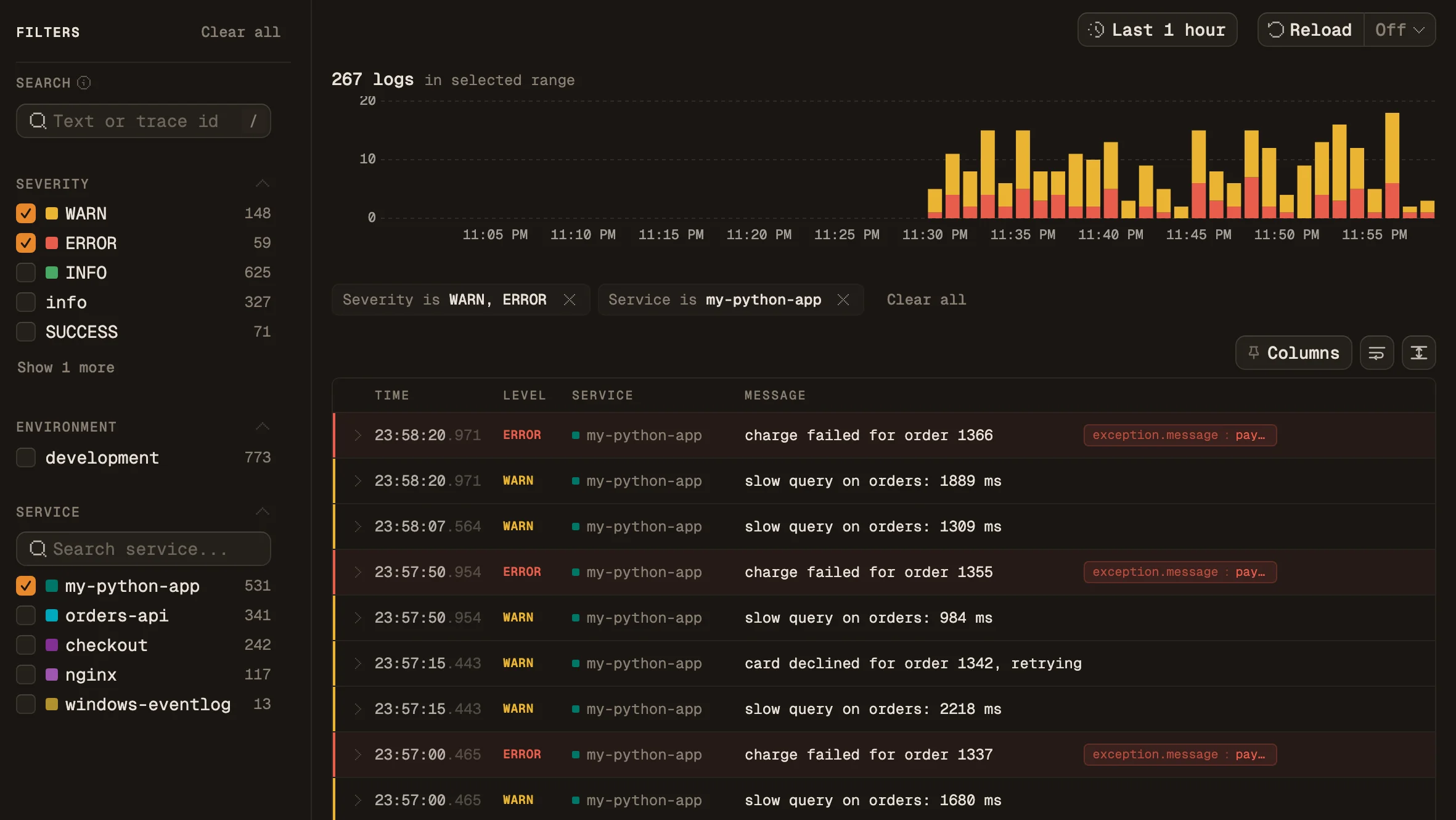
Open Logs and pick a level
Pick your app under Service in the sidebar, then include or exclude levels under Severity. The volume chart stacks log counts by level, in the colors this page uses.
- 02
Open a record
Click a row, then Open detail to see the message and its attributes. A record logged with
log.exception()carries the exception type, message and stack trace.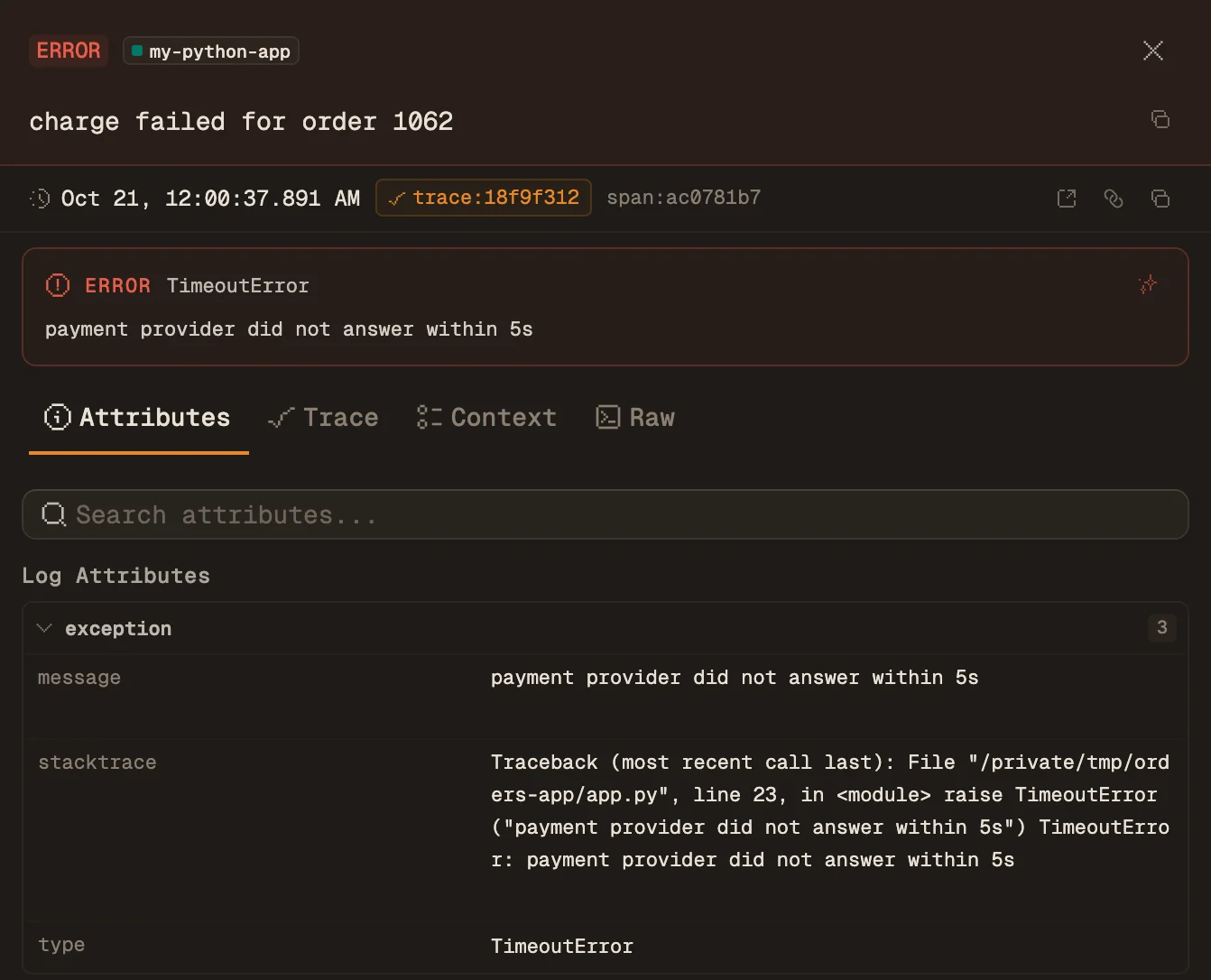
Python logs in Maple
Send your logging records to Maple
For traces and metrics from the same app, see the Python guide. Using Loguru instead of logging? See the Loguru guide.
05 · Mistakes
Common Python logging level mistakes
Lower-case level names
setLevel("debug") and basicConfig(level="debug") raise ValueError: Unknown level: 'debug'. Call .upper() on any name that comes from a user or a variable.
Losing the traceback
log.error(e) in an except block logs the message without the traceback. log.exception("charge failed") logs at ERROR and adds the traceback.
Configuring logging in a library
A library that calls basicConfig or sets the root level overrides the application's choice. A library only creates its logger with logging.getLogger(__name__), and the application sets the levels.
Formatting the message yourself
log.debug(f"payload {data}") builds the string even when DEBUG is off. log.debug("payload %s", data) only builds it for messages that pass the level.
Sources and further reading